Features · Reports

Eleven reports,
all in one place

Checks, CCP readings, issues, jobs, room cleans, handover sign-offs, visitors, COSHH, activities and spending, in one place. Pick the dates and the teams, then print it, download it, or save it and have it emailed on the 1st.

We set you up, and your 30-day free trial starts then.
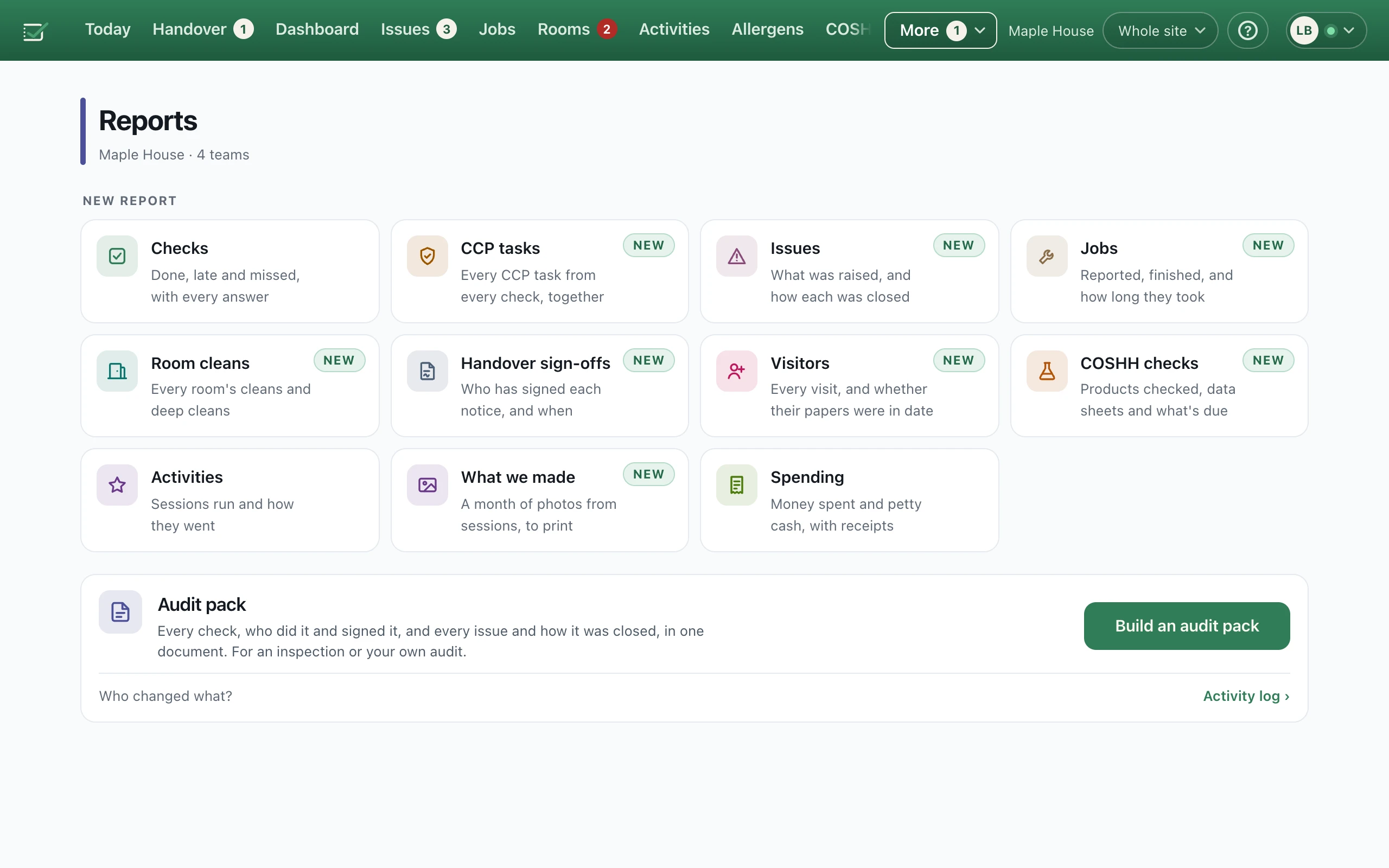
Reports at desk size, for Maple House and its 4 teams. Eleven to choose from, eight of them marked new: Checks, done, late and missed, with every answer; CCP tasks; Issues; Jobs, reported, finished and how long they took; Room cleans; Handover sign-offs, who has signed each notice and when; Visitors; COSHH checks; Activities; What we made; and Spending. Underneath, the audit pack, every check and who signed it and every issue and how it was closed, in one document, with Build an audit pack and a link to the activity log
The check report

Pick the dates, the teams, the checks and the person

Today, the last 7 days, the last 30, this month so far, last month, or your own dates. Leave every check ticked for the full record, or narrow it to look into one thing. Every answer, reading, signature and time is in the printout.

  • Print it, download a PDF, or take it away as a spreadsheet
  • A PDF is made while you get on with something else, and waits in Downloads for 7 days
  • Every download goes in the activity log, so you can see who took your records away
  • Team managers run their own team's reports without asking you

Comes with every team, on every plan. Reports are for managers, and for read-only and inspector logins. Each person is offered the reports for the parts of TaskProof their teams use.
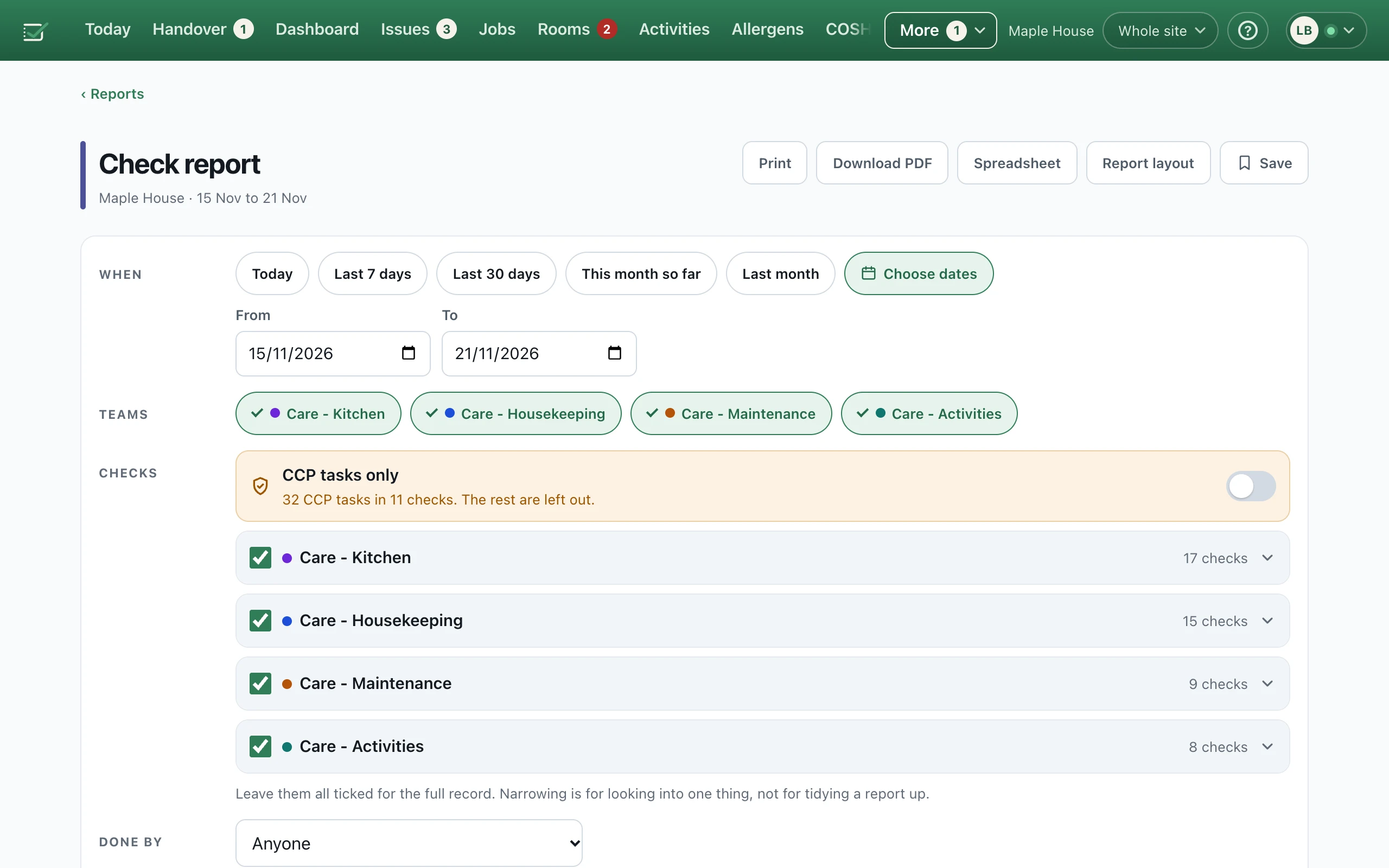
The check report at desk size, Maple House, 15 to 21 November, with Print, Download PDF, Spreadsheet, Report layout and Save along the top. When: today, last 7 days, last 30 days, this month so far, last month, or choose dates, set from 15/11/2026 to 21/11/2026. Teams: Care - Kitchen, Care - Housekeeping, Care - Maintenance and Care - Activities, all ticked. Checks: a switch for CCP tasks only, 32 CCP tasks in 11 checks, then each team's checks ticked, 17, 15, 9 and 8, with the line to leave them all ticked for the full record. Done by: anyone
CCP tasks only

Just the critical readings

Switch it on and the report keeps only the critical control points: 92 done, 91 in range, 1 out. The walk-in at 6.8°C is at the top, still open on the Issues list. The printout says at the top that it isn't the full record.
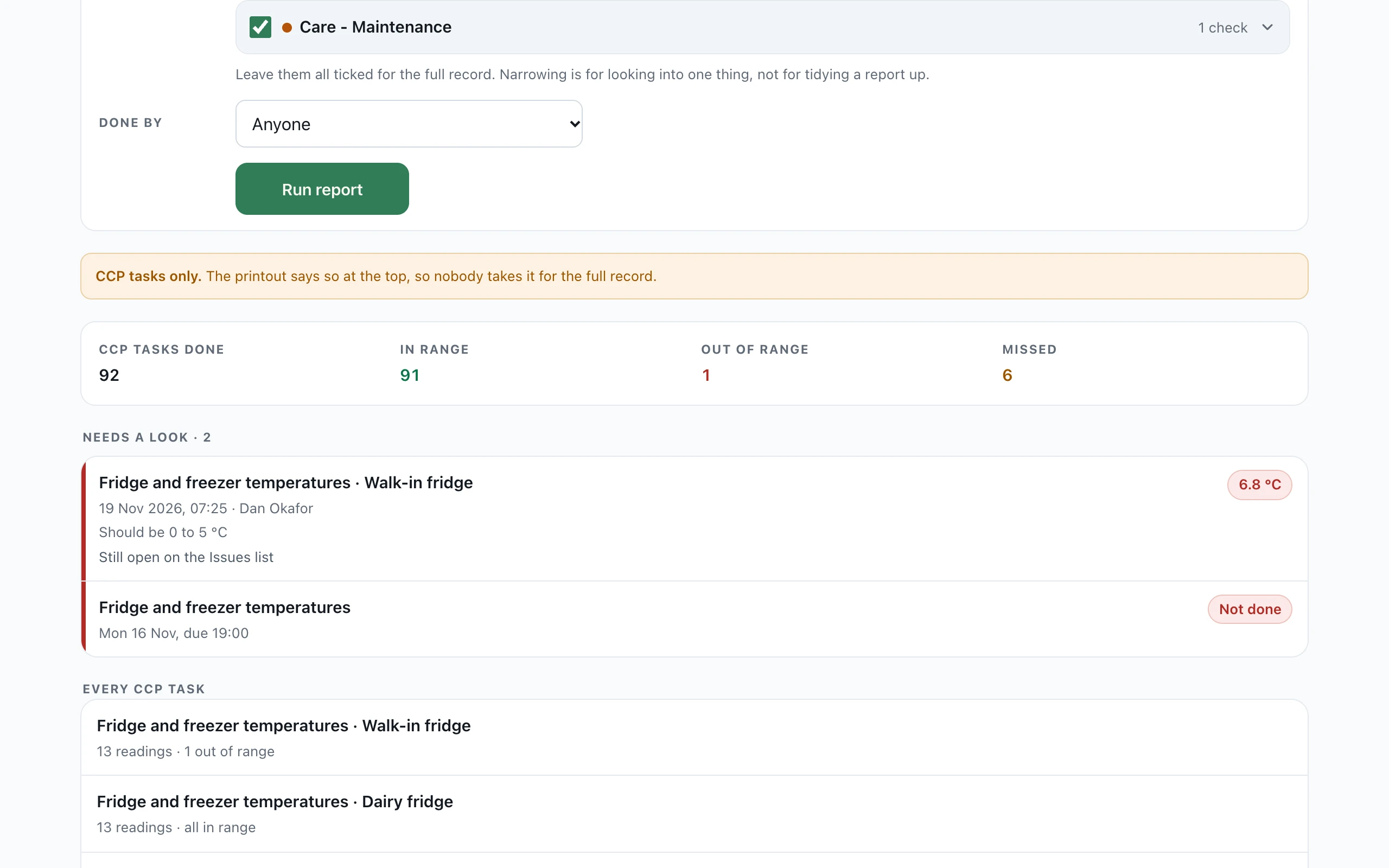
The check report with CCP tasks only switched on, and a banner: the printout says so at the top, so nobody takes it for the full record. 92 CCP tasks done, 91 in range, 1 out of range, 6 missed. Needs a look: the walk-in fridge at 6.8°C, 19 November at 07:25, Dan Okafor, should be 0 to 5°C, still open on the Issues list; and fridge and freezer temperatures not done on Monday 16 November, due 19:00. Then every CCP task: the walk-in fridge, 13 readings, 1 out of range; the dairy fridge, 13 readings, all in range
Save it

The month's report, on the 1st, without asking

Name it and choose its dates: last month, the last 7 days, this month so far, or always the same. Keep it to yourself or share it with everyone who runs reports, each seeing only their own sites and teams. Tick "Email me a link on the 1st" and at 8am on the 1st a link to run it arrives. Nothing is attached.
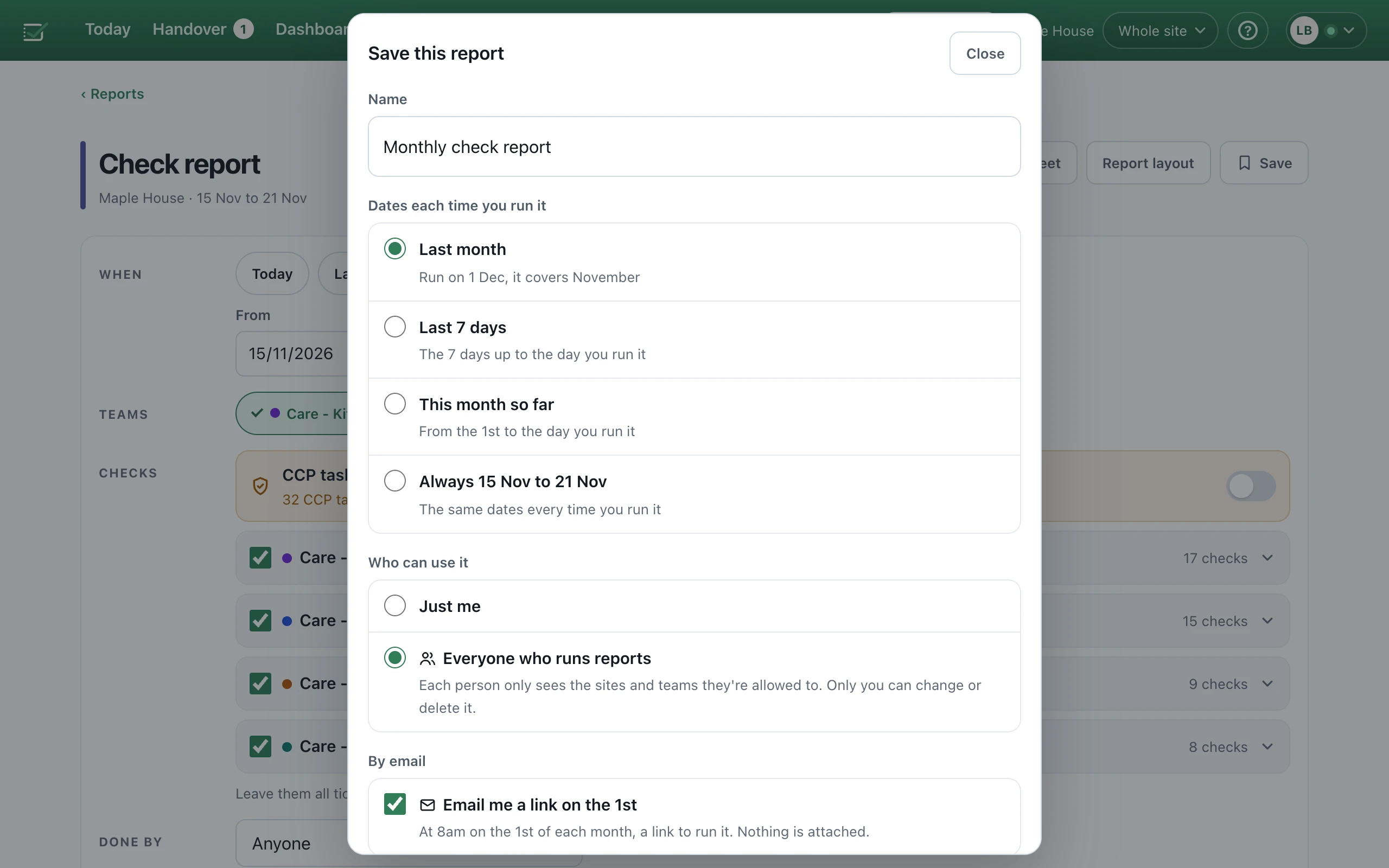
Saving the check report. Name: Monthly check report. Dates each time you run it: last month, chosen, run on 1 December it covers November; or the last 7 days; this month so far; or always 15 to 21 November. Who can use it: just me, or everyone who runs reports, chosen, each person only seeing the sites and teams they're allowed to, and only you can change or delete it. By email: email me a link on the 1st, ticked, at 8am on the 1st of each month, a link to run it, nothing attached
Three more

Issues, jobs and visitors

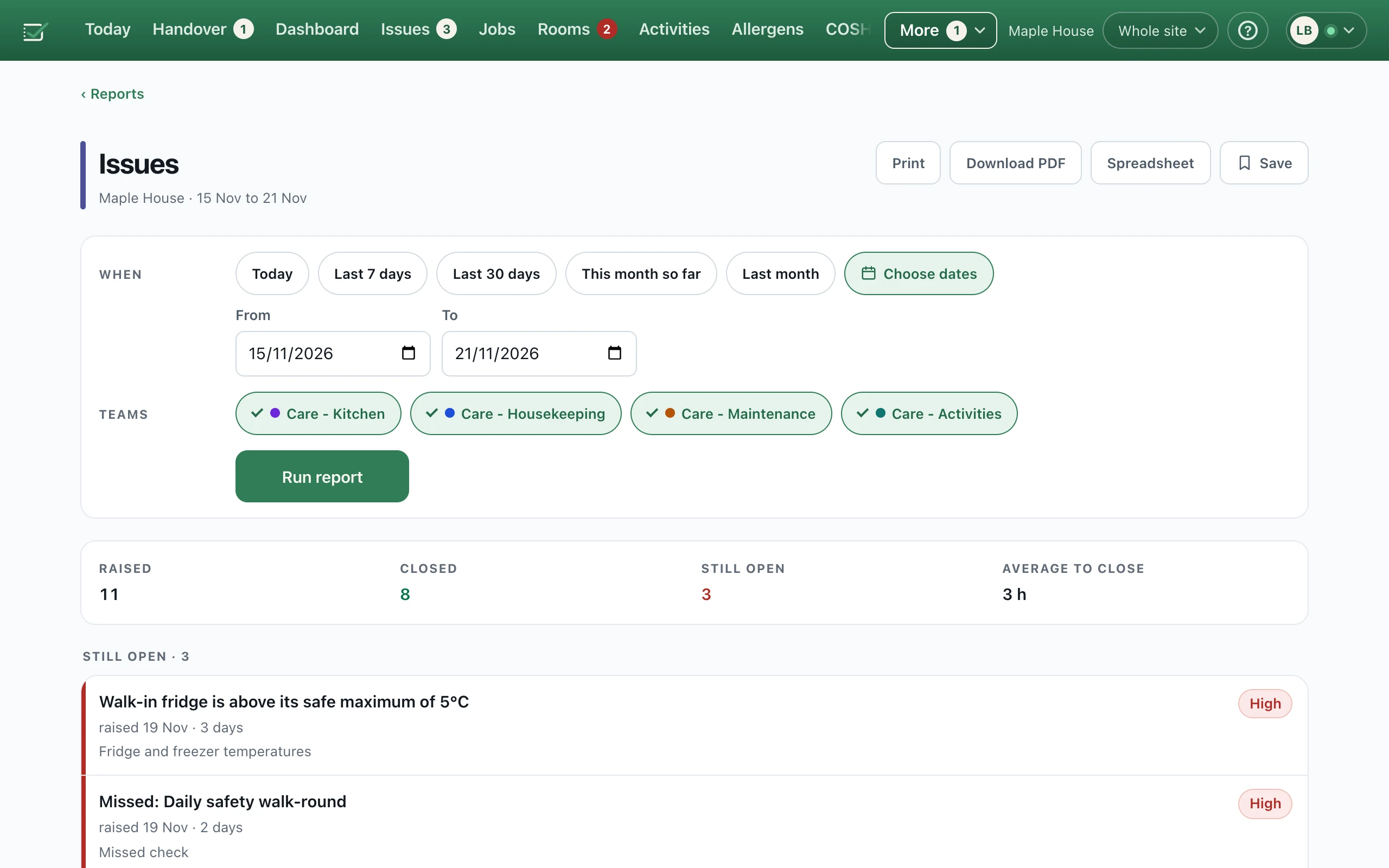
  • The issues report, 15 to 21 November, every team ticked: 11 raised, 8 closed, 3 still open, 3 hours on average to close. Still open, 3: the walk-in fridge above its safe maximum of 5°C, raised 19 November, 3 days, high; and a missed daily safety walk-round, raised 19 November, 2 days, high
    Issues. 11 raised, 8 closed, 3 still open, 3 hours on average to close.

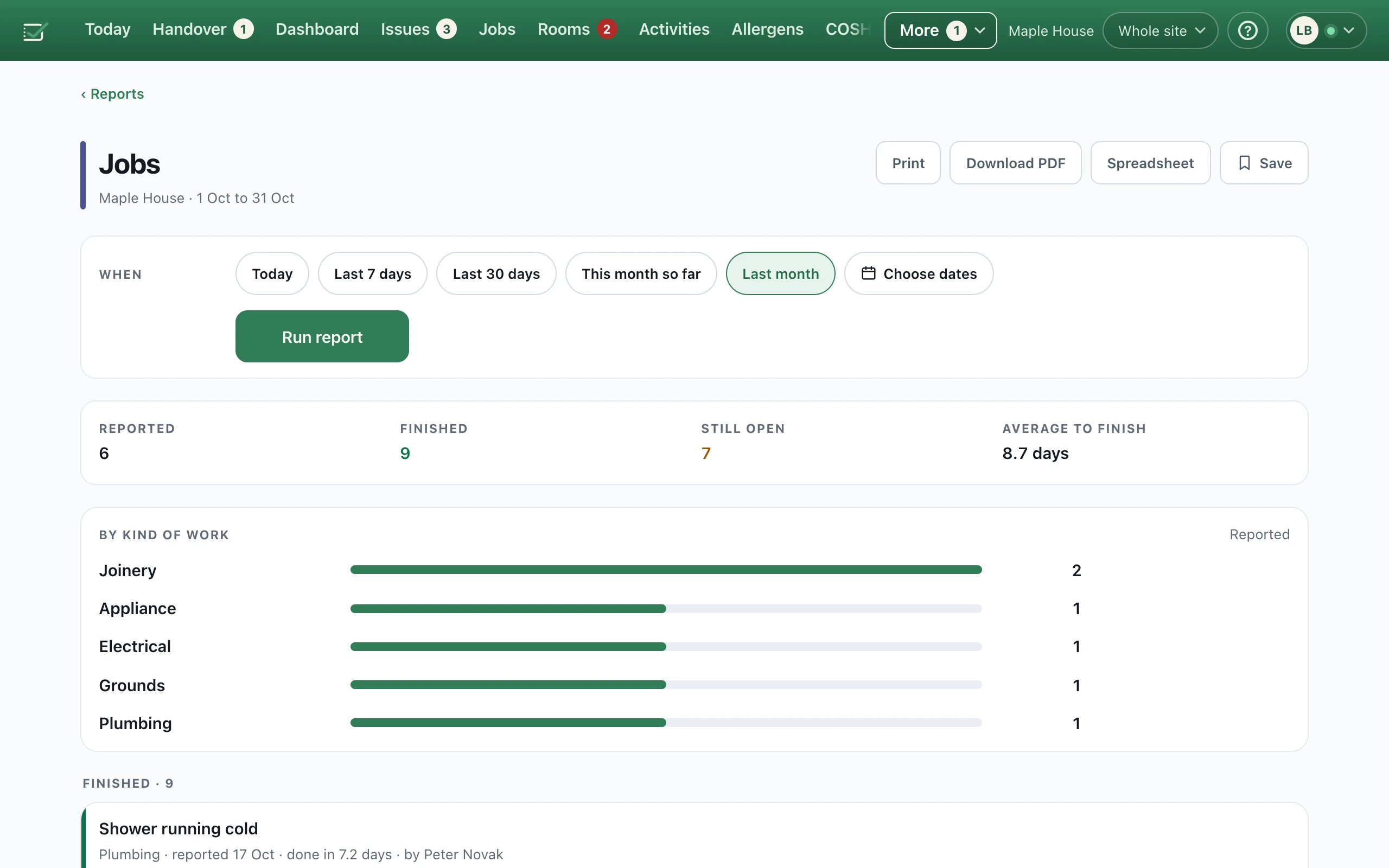
  • The jobs report for last month, 1 to 31 October: 6 reported, 9 finished, 7 still open, 8.7 days on average to finish. By kind of work: joinery 2, appliance 1, electrical 1, grounds 1, plumbing 1. Then finished, 9, starting with a shower running cold, plumbing, reported 17 October, done in 7.2 days by Peter Novak

    Jobs. October: 9 finished, 8.7 days on average, and each kind of work.
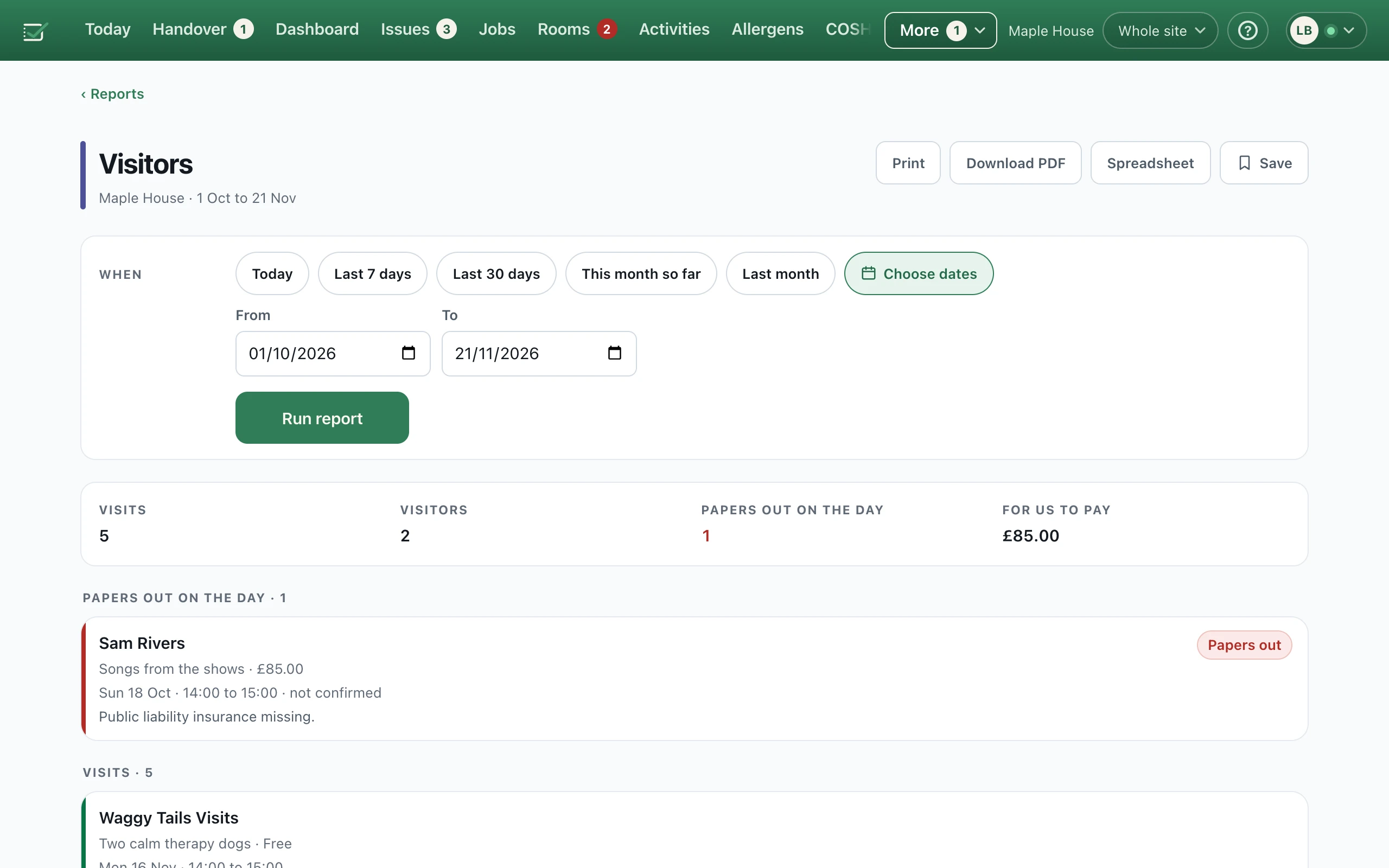
  • The visitors report, 1 October to 21 November: 5 visits, 2 visitors, 1 with papers out on the day, £85.00 for us to pay. Papers out on the day: Sam Rivers, songs from the shows, £85.00, Sunday 18 October 14:00 to 15:00, not confirmed, public liability insurance missing. Then every visit, starting with Waggy Tails Visits, two calm therapy dogs, free

    Visitors. One entertainer with public liability insurance missing on the day.

All eleven

What each report covers

  • ChecksDone, late and missed, with every answer, reading, signature and time.
  • CCP tasksOnly the critical control points, such as fridge readings: in range, out of range and missed.
  • IssuesWhat was raised, how each was closed, what's still open, and how long closing takes.
  • JobsReported and finished, how long they took, each kind of work, and what's still open.
  • Room cleansEvery room's cleans and deep cleans, room by room.
  • Handover sign-offsWho has signed each notice and when, and who hasn't yet. For managers.
  • VisitorsEvery visit, and whether the visitor's papers were in date on the day.
  • COSHH checksProducts checked against their data sheets, missing data sheets, and what's due.
  • ActivitiesSessions run and how they went.
  • What we madeA month of photos from activity sessions, to print for the noticeboard or the newsletter.
  • SpendingMoney spent and petty cash by month, with the receipts. For managers.
Over to you

Pick what would help. A person answers.

Some people want to watch a round get done. Some have one question and five minutes. Choose whichever suits you today.

  • You'll hear from someone who has worked in a care home kitchen, not a sales team
  • No obligation, and nobody will chase you afterwards
What would help most?

We’ll email you to fix a time for the video call.

We only use these to reply to you. No newsletter, no mailing list, and we never sell them or share them for marketing.